
Core Web Vitals
Core Web Vitals in 2026: What They Are, Why They Still Matter, and How to Fix Them Fast
Core Web Vitals are a set of speed and user experience metrics that Google uses as ranking signals. They measure how fast the page loads, how stable it is while loading, and how quickly it becomes interactive. Poor...
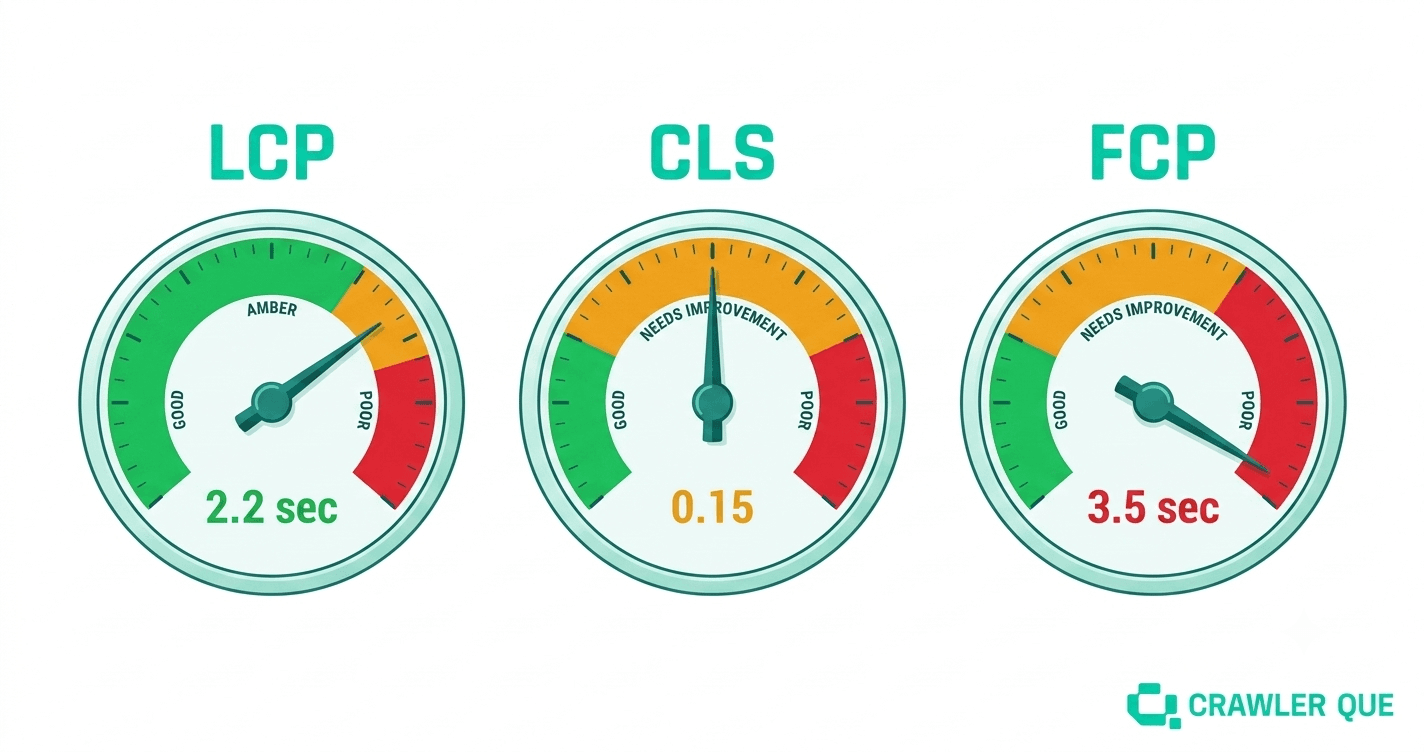
Core Web Vitals are a set of speed and user experience metrics that Google uses as ranking signals. They measure how fast the page loads, how stable it is while loading, and how quickly it becomes interactive. Poor scores do not immediately kill your rankings, but they create a disadvantage in competitive SERPs, and they directly impact the user experience that determines whether visitors stay or leave.
Core Web Vitals measure LCP (load speed), CLS (layout stability), and FCP (time to first content). Google confirmed these remain ranking signals in 2026. Poor scores cost you ranking equity in competitive searches and increase bounce rates.
The Three Core Web Vitals Explained
LCP — Largest Contentful Paint
LCP measures how long it takes for the largest visible content element on the page to load. This is usually the hero image, a large heading, or a video thumbnail. LCP is the metric most directly connected to perceived load speed from a user's perspective.
| Score | LCP Time | Status |
| Good | Under 2.5 seconds | Pass |
| Needs improvement | 2.5 – 4.0 seconds | Monitor |
| Poor | Over 4.0 seconds | Fix required |
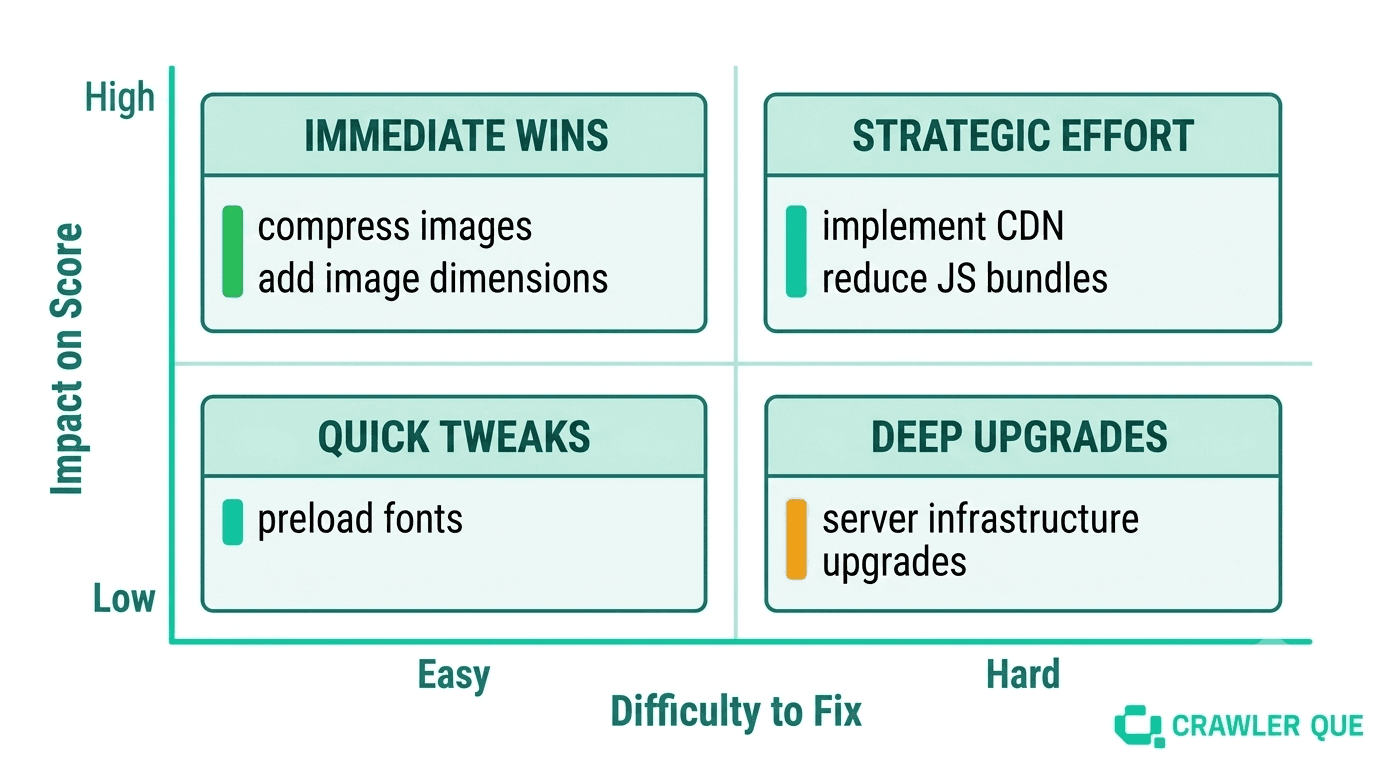
Most common causes of poor LCP: uncompressed images, render-blocking JavaScript, slow server response time, and no CDN for static assets.
CLS — Cumulative Layout Shift
CLS measures how much the page layout unexpectedly shifts during loading. If a button moves just as a user is about to tap it, or an image loads and pushes text down the screen, that is a layout shift. CLS scores the total amount of unexpected movement during the page's life.
| Score | CLS Value | Status |
| Good | Under 0.1 | Pass |
| Needs improvement | 0.1 – 0.25 | Monitor |
| Poor | Over 0.25 | Fix required |
Most common causes of poor CLS: images without explicit width and height attributes, dynamically injected content (ads, banners, cookie notices), and web fonts loading after text.
FCP — First Contentful Paint
FCP measures the time from page load to when any content element, text, image, or non-white canvas, first appears on screen. It is the user's first signal that something is happening. Slow FCP makes a page feel broken even when LCP is acceptable.
| Score | FCP Time | Status |
| Good | Under 1.8 seconds | Pass |
| Needs improvement | 1.8 – 3.0 seconds | Monitor |
| Poor | Over 3.0 seconds | Fix required |
Most common causes of poor FCP: render-blocking resources in the page head, large JavaScript bundles, and slow initial server response (TTFB).
How to Check Your Core Web Vitals
There are two types of Core Web Vitals data: field data (real user measurements) and lab data (controlled test results).
Field data comes from Chrome users actually loading your pages and is what Google uses for ranking. You can access it in Google Search Console under "Core Web Vitals" or in PageSpeed Insights under the "Discover what your real users are experiencing" section.
Lab data is a simulated test from a controlled environment, useful for debugging specific issues but not what Google uses for ranking. PageSpeed Insights, Lighthouse, and Crawler Que's Core Web Vitals module all provide lab data with specific issue breakdowns.
Crawler Que runs PageSpeed Insights on both mobile and desktop for every audit and returns prioritized fix recommendations specific to the tested URL, not generic advice, but the actual issues affecting that site's scores.
The Fastest Fixes by Metric
To improve LCP
Compress and convert hero images to WebP format
Add loading="eager" and fetchpriority="high" to the LCP image element
Remove or defer render-blocking JavaScript and CSS in the page head
Use a CDN to reduce server distance for static assets
To improve CLS
Add explicit width and height attributes to all <img> tags
Reserve space for ad slots and dynamically loaded content with CSS aspect-ratio or fixed height
Use font-display: swap and preload critical fonts to prevent font-swap shifts
To improve FCP
Move render-blocking scripts to the bottom of the body or add defer / async attributes
Inline critical CSS needed for above-the-fold rendering
Improve server response time, target under 200ms TTFB
Why Mobile Scores Matter More Than Desktop
Google uses mobile-first indexing, which means the mobile version of your site is what determines rankings, not the desktop version. Core Web Vitals scores on mobile are typically significantly worse than desktop scores, especially for image-heavy sites on slower connections.
Crawler Que's Core Web Vitals module tests both mobile and desktop and flags the gap when mobile performance is the primary issue. Focusing fixed effort on mobile typically produces more ranking benefits than equivalent desktop improvements.
Run the check first. A free Crawler Que audit will show you your current LCP, CLS, and FCP scores on mobile and desktop with specific issues listed in priority order. Fixing the top three issues in the report is usually enough to move from "needs improvement" to "good" for most small business sites.
Core Web Vitals audit module → See a sample report → Run free Core Web Vitals check →
Check your Core Web Vitals scores, free
Crawler Que runs PageSpeed mobile and desktop with prioritized fix recommendations. No signup, results in under 2 minutes.
Run free audit →
Want to audit your website?
Run a Crawler Que audit to check SEO, Core Web Vitals, traffic signals, competitors, backlinks, recommendations, and AI search visibility.
Run website audit